
WP7 AOTW: YouTube Download

This week’s  Windows Phone app of the week is YouTube Download.

This app is like Ronseal. It does exactly what it says on the tin. It allows you to download HD videos on to your phone from YouTube. To download a video all you need to do is to search for the video in question and press download. It then gets added to your download queue. You can even choose what quality the video downloads in. One of the best things about this app is that the videos you have downloaded are then available in the music and video hub along with all your other audiovisual content to ensure that all your media remains centralised as Microsoft intended.

YouTube Download, Windows Phone 7, 79p

Download from the Marketplace
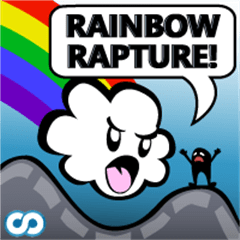
WP7 AOTW: Rainbow Rapture

This weeks AOTW is Rainbow Rapture by Kindling Games. This is the first game to appear as my AOTW, and for a very good reason. It’s just about the most random, weird, trippy and truly fantastic Tiny Wings rip off ever.

Yes, it is yet another game where you slide up and down hills trying to get as far as possible. However this app deserves an AOTW not for originality, but for the fact that it has taken an old idea and made it different. The whole basis of this game is that you are a rainbow/cloud/god thing that helped to create the world and all its beauty. The humans, however, have taken your world and turned it grey and boring. Because of this, you have decided to destroy them.

By eating them.

There are three main power-ups in the game. these are car, oil and blimp. The car gives you a speed boost, the oil allows you to slide across the ground and the blimp makes you suck up people as you fly over them.

Have a look at our gameplay demo (filmed in our office) in the video below.

See? Get it NOW!

Rainbow Rapture, Windows Phone 7, Free or £1.29

Download from the Marketplace or visit the website

WP7 AOTW: Smart Tile

This week’s AOTW for WP7 is called ‘Smart Tile’.

This is essentially an app that allows you to pin a note to your home screen. When you enter the app you are faced with four lines in which to write your notes. These notes will then appear on a live tile when you pin the app to your home screen. The idea of this app is great, I find it especially useful for things such as writing down my prep (homework but for private/boarding schools) and reminding me when I have music lessons.

The amount of customisation that is possible on the live tile makes this a very good app. You can change the colour of the tile to any of the theme colours on you WP7 device and a few additional ones such as slate, cherry and camel. It is also possible to change the background image to things such as a light bulb and an exclamation mark.

Smart Tile, Windows Phone 7, Free

Download from the Marketplace or visit the website

WP7 AOTW: MegaTile

This weeks App Of The Week for Windows Phone 7 is MegaTile.

This app allows you to create custom tiles to pin to the Metro UI home screen of your Windows Phone. This tile can be customized to fill a number of different functions from linking to a specific web page to acting as a speed dial for a single contact. This app is made even better by the fact that you can use a picture from your photo album as the image on the tile. In addition, such images can spread over multiple tiles relating to a single topic.

This is a great app which is a must have for all WP7 users who yearn for that extra bit of customisation.

MegaTile, Windows Phone 7, £0.79

Download from the Marketplace or visit the website

iOS AOTW: GarageBand

From now on I will be doing (roughly once a week) a post on a good iOS app and what I think about it. Today we get a first party app called GarageBand.

It’s GarageBand. On iPad, iPhone and iPod touch. Need I say more?

GarageBand, iOS, £2.99

Download from the App Store or visit the website

WP7 AOTW: Torchbear

From now on I will be doing (roughly once a week) a post on a good Windows Phone 7 app and what I think about it. For the first post I am going to do a free app called Torchbear.

Torchbear is a ‘social game’ in which the users create a torch which can be passed on from player to player via their phone’s location services. A torch can be passed on to any player within 1.6 km and each player can only carry one torch at a time. Each torch must be given a description of what it is for. The first torch that I created contained a link to this blog but others are created to spread a message, promote a cause or for people to post pictures on the torch on a specific subject.

The only problem that I have with Torchbear is that there are not enough users for passing on a torch to be easy. In order for me to pass one on I have to travel 9 km into Brighton.

Torchbear is a fun app that, if you have a Windows Phone, I recommend you download.

Torchbear, Windows Phone 7, Free

Download on the Marketplace or visit the website